

Agreeing with an IRS correction may mean you don’t need to reply. To understand how to handle an IRS notice, first check the tax year and read the instructions. If you accept the changes, note them on your copy of the return and keep it with your records. You still need to act if the IRS requests information or the notice shows a balance due.
A correction notice can feel like a sign that something went wrong, but it isn’t always. IRS notices may flag a question, a changed amount, or another issue that needs attention. The details matter more than the envelope.
This guide explains how to identify the tax year, recognize common reasons for a notice, and respond when you agree with a correction. It also covers when the notice calls for payment or additional information, and why following its specific instructions is the clearest next step.
Key Takeaways
- Match the notice to the tax year it identifies before comparing it with a return.
- Look for the specific issue and response instructions; notices can concern a balance, a changed refund, or a question about your return.
- If you agree with a correction, record it on your copy of the return and keep that copy with your tax records.
- If you receive Notice CP2000, refer to Topic no. 652, according to the Internal Revenue Service.
Responding when you agree with a notice
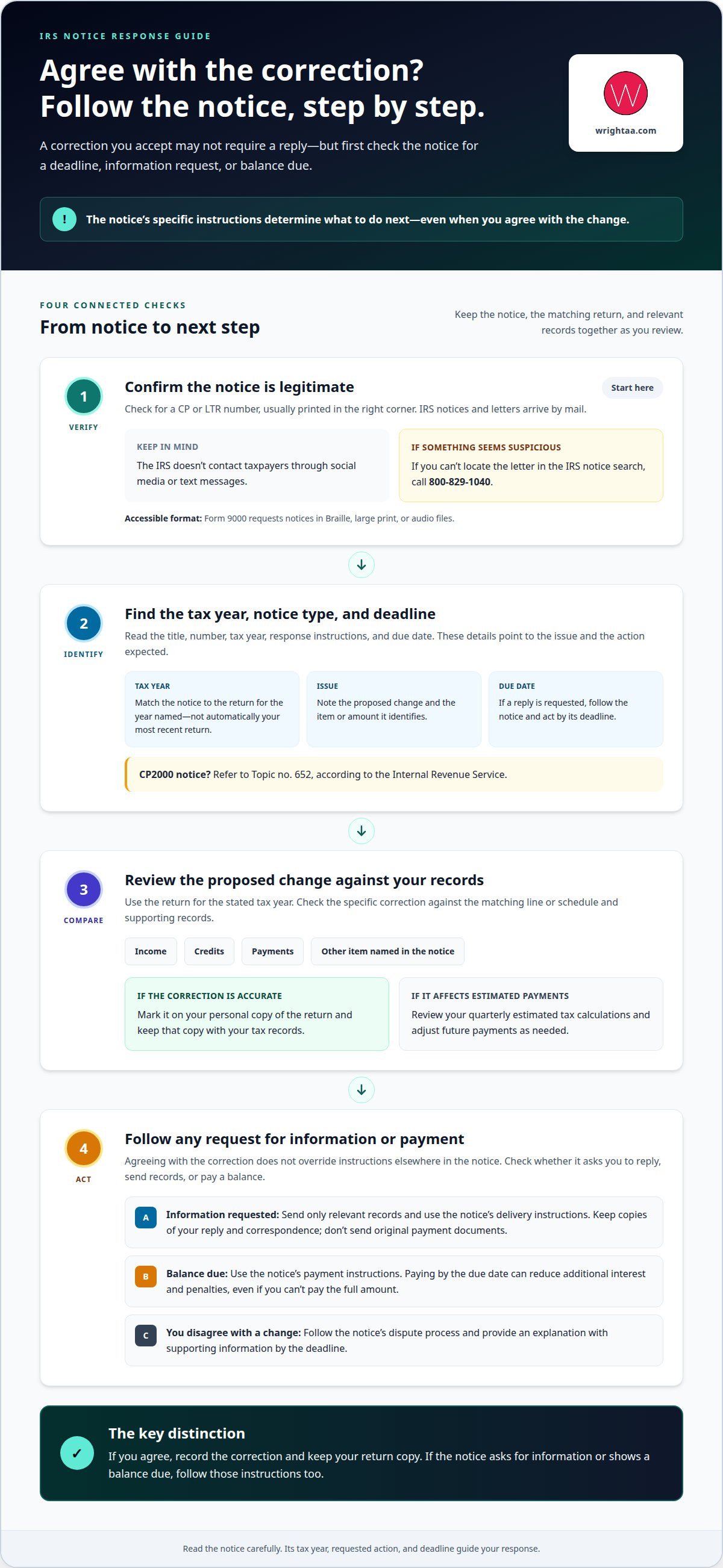
Follow the notice’s instructions, even if you accept the correction. First confirm the letter is genuine, then identify its deadline, proposed change, and any payment or document request.
Confirm the Notice Is Legitimate
1. Check the notice for a CP or LTR number, usually printed in the right corner. IRS notices and letters arrive by mail; the IRS doesn’t contact taxpayers through social media or text messages. If the letter seems suspicious or you can’t locate it in the IRS notice search, call 800-829-1040. The Internal Revenue Service says Form 9000 requests notices in Braille, large print, or audio files.
If the letter is difficult to read, Form 9000 gives you an accessible-format request option.
Identify the Notice Type and Deadline
2. Read the notice title, number, tax year, response instructions, and due date. These details identify the issue and the action the IRS expects. If the letter asks for a reply, act by its deadline. Missing it can delay resolution and may lead to additional interest or penalties. Contact a tax professional when the requested action or deadline is unclear.
For a CP2000 notice, refer to Topic no. 652, according to the Internal Revenue Service.
Review the Proposed Change
3. Compare each correction with your return and supporting records before agreeing. Check the income, credits, payments, or other item identified in the notice. If the correction is accurate, mark it on your personal copy of the return and keep that copy with your tax records. If you agree with a correction, you may not need to contact the agency, but check the notice for any instructions.
If the change affects quarterly estimated tax payments, review your calculations and adjust future payments as needed.
Respond Carefully and Avoid Mistakes
4. If the notice requests information, send only the relevant records and follow its delivery instructions. Keep copies of your reply and all IRS correspondence; never send original payment documents. If you disagree, follow the notice’s dispute process and provide an explanation with supporting information by the deadline.
If you owe a balance, use the notice’s payment instructions. Paying by the due date can reduce additional interest and penalties, even if you can’t pay the full amount. A tax professional can help you assess a disputed change or payment issue.
Checking which tax year an IRS notice concerns
Start with the tax year named in the notice. Don’t assume it concerns your most recent return.
- Locate the year in the notice. Read the full letter, including its explanation and any enclosed pages. Find the tax year connected to the issue, then note it beside the notice date. The year under review may differ from the year you filed most recently, so don’t rely on the envelope or arrival date.
- Match it to the correct return. Pull the personal copy of the return for the year identified. Compare the notice’s issue with the corresponding line or schedule, rather than a return from another year. If you filed returns for several years, keep them separate while reviewing each notice detail.
- Gather records for that same year. Collect relevant income statements, receipts, payment records, and earlier IRS correspondence. Match each document to the year shown on the notice. A record from a different tax year may not explain the amount or item the IRS is asking about.
- Check account details if the year remains unclear. You can view tax account information on IRS.gov if you’re unsure whether you owe money. Compare the account information with the notice and the return for the stated year. Keep notes about any difference, including the item and tax year involved.
- Keep the year attached to every response. Write it on your working copy and use it when organizing supporting documents. If the notice concerns an earlier return, don’t substitute updated figures from a later filing. This simple separation helps prevent sending records that address the wrong period.
A year-by-year file makes comparisons more precise. If several returns or records need sorting, organize your tax documents before deciding what the notice requires.
Common reasons the IRS sends notices
Many IRS notices are routine letters generated by automated systems to flag items for review. Knowing how to handle an IRS notice starts with identifying the issue named in the letter and the action it calls for.
- Check for a balance due. The notice may say the IRS records show unpaid tax. Compare the amount with your return, payment records, and account information. If you already paid, gather proof. If a balance remains, follow the notice’s payment instructions and note its due date.
- Look for a refund adjustment. An IRS notice may explain that your refund changed after return processing. Read the reason and compare the affected item with your filed return. If the notice changes a reported amount, trace it to the relevant line and supporting record before deciding whether you agree.
- Read any question about your return. The IRS may request clarification or supporting information for a reported item. Identify precisely what the letter asks you to explain. Gather the matching statement, receipt, or other record, then follow the response instructions instead of sending unrelated paperwork.
- Respond to an identity verification request. Some notices ask recipients to verify their identity before the IRS continues processing a return. Follow the letter’s stated steps and use its instructions. Treat this as a specific request, not proof that the entire return has been rejected.
- Review any correction carefully. The IRS may notify you that it changed information on your return. Compare each change with your records. If you agree, record the correction on your return copy; if you disagree, use the notice’s response process. This is a central step in how to handle an IRS notice.
- Distinguish a processing delay from a proposed change. A notice may explain that processing is delayed rather than request payment or correction. Read the requested action closely. If the letter asks for no response, keep it with your tax records and watch for later correspondence about the same issue.
Handling a correction notice you agree with
If the correction matches your records, use the notice to guide any remaining action. If you agree with a correction, check whether the notice asks you to take any further action.
- Confirm what the correction changes. Compare the notice with the return for the tax year it identifies. Review each adjusted item, such as reported income or a credit, against your filed figures and supporting records. Make sure you agree with the specific change, not just the general explanation. If one item still appears wrong, don’t treat the entire notice as accepted.
- Record the correction on your return copy. Mark the changed figures on your personal copy and keep it with the notice. This creates a clear record of what the IRS changed and why. Keep related statements, receipts, and prior correspondence together, so you can explain the adjustment if the issue comes up during later tax preparation.
- Check whether the notice requires action. After the IRS changes or corrects a return, act if the notice requests more information or shows a balance due. If it asks for documents, follow its directions and send copies rather than original records. If you owe, follow the payment instructions. Paying by the due date can reduce additional interest and penalties, even if you can’t pay the full amount.
- Review estimates and future figures. If you make quarterly estimated tax payments, revisit your calculation after an IRS change. The revised return figures may affect the amounts you planned to pay. Compare the notice’s adjustment with your current estimate and update your working calculation where needed. Keep the revised figures with your tax records.
Keep the notice and your annotated return together. If a correction affects future filings, talk through the next tax steps before preparing them.
Wright CPAs: Tax Planning and Preparation
Wright CPAs helps individuals and business owners organize tax filings and financial records through Tax Planning and Preparation. If an IRS correction affects a return, this support can help you understand how the change fits your tax records and future planning. Bookkeeping can help keep financial information organized for upcoming filings, while Payroll Services can support businesses reviewing payroll records related to reported income.
Consider tax preparation support when a notice raises questions about how a correction may affect your next return, or when records need to be reconciled before filing. For a broader view of business finances, CFO Services can help owners assess financial information and plan ahead.
Contact Wright CPAs to discuss your tax planning and preparation needs, or visit wrightaa.com.
Carry a Clear Record Forward
Knowing how to handle an IRS notice can also help make your next filing more orderly. Keep consistent records of decisions, supporting documents, and the reason for each adjustment. That history can make future preparation more coherent, especially when a correction changes information used for later estimates or returns.
Build a simple, repeatable process: save each notice with the related return, record any action taken, and retain copies of correspondence and payment evidence. A well-kept file gives you a reliable reference when questions arise. It also helps distinguish a resolved correction from an issue that still needs attention.
If you’d like a considered approach to your tax records and next filing, contact Wright CPAs. A clear record and a deliberate next step can make tax matters easier to manage.
Frequently Asked Questions
What should I do first after receiving an IRS notice?
Read the entire notice and identify the tax year, issue, and requested action before responding. Then compare the item in question with the corresponding return and records. For example, if the IRS asks about reported interest, find the related income statement and return entry. This helps you determine whether the notice requires a reply, payment, or supporting documents.
How do I respond to an IRS notice online, by mail, or by phone?
Use the response method and contact details provided in your notice. If it offers an online response option, follow the instructions and save a copy of what you submit. If it directs you to mail documents, use the address shown on the letter and keep copies. If you need to call, use the phone number in the notice’s upper-right corner and take notes during the conversation.
What documents should I include when responding to an IRS notice?
Send records that directly support your answer, such as the relevant return page, income statement, receipt, or earlier IRS correspondence. For an electronic payment the IRS hasn’t credited, include a transaction copy showing the confirmation number and payment method. For a canceled check, provide copies of both sides. For a money order, obtain copies of both sides from the place where you bought it. Keep the originals and a complete copy of your response.
Can I get penalty or interest relief after receiving an IRS notice?
Taking timely action can minimize additional interest and penalties. Paying the amount due by the notice’s due date can reduce added charges, even if you can’t pay the full amount.
How can I pay an IRS balance or set up a payment plan?
Follow the notice’s payment instructions and pay by its due date to reduce additional interest and penalties, even if you can’t pay the full amount. The material provides no steps for setting up a payment plan.
When should I contact a tax professional or the Taxpayer Advocate Service?
Contact a tax professional if the requested action or deadline is unclear, or if you need help assessing a disputed change or payment issue. The material provides no guidance on when to contact the Taxpayer Advocate Service.


