

What if the best accounting system isn’t the one with the most features, but the one that fits the way your business already works? Knowing how to choose an accounting system starts with your transactions, routines, and reporting needs, not a long list of tools you may never use.
It’s reasonable to feel unsure. Changing software can disrupt familiar processes, and bookkeeping reports don’t always show how financial records connect to taxes or business decisions. The right setup should make day-to-day recordkeeping manageable while keeping financial information organized and useful.
This guide will help you assess what your business needs, compare accounting system options, and plan a transition that preserves continuity. You’ll also learn which reports and processes to prioritize so your records can support tax preparation and planning, cash flow visibility, and more confident decisions throughout the year. Clean, tax-ready books begin with a system shaped around your business.
Key Takeaways
- Learn how to choose an accounting system by mapping it to the transactions, routines, and financial questions your business needs to manage.
- Compare spreadsheets, accounting software, and bookkeeping support by their setup demands, reporting, collaboration, and consistency.
- Use a practical comparison matrix to weigh workflow fit, access, record continuity, and how easily your team can understand reports.
- Protect financial clarity during a system change by documenting current processes and following a deliberate transition sequence.
- See how bookkeeping, balance-sheet reconciliation, customized reporting, and process optimization can help create a dependable accounting process.
How to Choose an Accounting System: Start With Your Business's Financial Workflow
Records can be complete and still leave you guessing. You may see money coming in but not know which invoices remain unpaid, what bills are due, or whether available cash can cover an upcoming expense. Those gaps often point to a workflow problem, not simply a missing software feature.
An accounting system combines the people, processes, and tools a business uses to record, organize, and understand its finances. The Accounting Information System concept captures this broader view: software is one component, alongside the procedures and people that turn transactions into useful information. That distinction matters. A tool supports clear records only when it fits the way financial work gets done.
To understand how to choose an accounting system, map the work that happens between a transaction and a decision. Note where information starts, who handles it, and what questions the resulting records should answer. There is no universal software winner. A business with a small number of straightforward transactions may need a different setup from one managing frequent customer payments, payroll, bills, or several people’s review responsibilities.
Which financial tasks should your accounting system support?
Trace the flow of money through the business. List where income comes from and how it’s recorded, how expenses and bills are captured, and how customer payments are received and matched to invoices. Include recurring work such as payroll entries, expense documentation, and bank or account reconciliations where relevant. Describe your actual process, including steps that happen outside a bookkeeping tool.
Then assign the roles. Identify who enters transactions, who reviews them, who reconciles accounts, and who uses the finished information. One person may handle several tasks, but writing down the responsibilities can reveal a missing review step or a process that relies on someone’s memory.
- Record the source of each transaction, such as an invoice, bill, payment record, or receipt.
- Mark which steps are manual, repeated, or spread across separate files and tools.
- Note where delays or unclear handoffs make it harder to keep records current.
This map turns everyday frustrations into system requirements. If invoices are often outstanding, for example, tracking customer payments may matter more than a feature you rarely use.
What should you want to understand from your records?
Choose reports by starting with the decisions they need to inform. A profit and loss statement summarizes income and expenses over a period, helping you review operating results. A balance sheet shows assets, liabilities, and equity at a point in time. A cash flow statement organizes cash moving into and out of the business, offering a view of liquidity that differs from profit.
Ask what you need to know, and when. Do you review spending before making a purchase? Need to see whether customer payments are keeping pace with bills? Want to understand business performance over a period? Your answers help define which reports must be easy to produce and interpret, and how often you need to review them.
Keep tax preparation and planning in view throughout the year, not only when a filing deadline approaches. Consistent transaction details and organized supporting records make financial activity easier to review and help inform planning conversations. Use these reporting needs, together with your workflow map, as the foundation for comparing system options.
Compare Accounting System Types and the Reports They Can Support
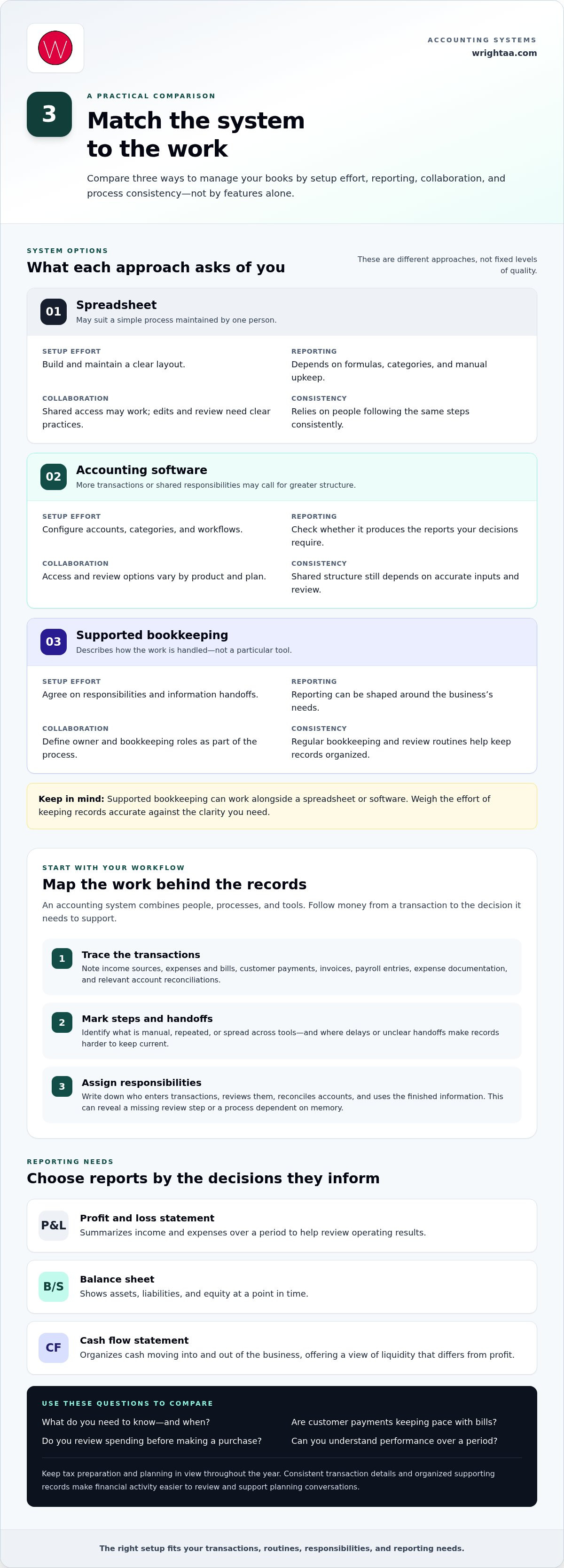
Once you’ve mapped the work, compare the ways you could manage it. A spreadsheet, accounting software, and supported bookkeeping are different approaches, not fixed levels of quality. The useful question is how each would handle your records, review steps, and reporting needs. A spreadsheet may suit a simple process maintained by one person; more transactions or shared responsibilities may call for greater structure.
| Approach | Setup effort | Reporting capabilities | Collaboration | Process consistency |
|---|---|---|---|---|
| Spreadsheet | Requires building and maintaining a clear layout. | Reports depend on formulas, categories, and manual upkeep. | Shared access may be possible, but edits and review need clear practices. | Relies on people following the same steps consistently. |
| Accounting software | Requires configuring accounts, categories, and workflows. | Assess whether it produces the reports your decisions require. | Access and review options vary by product and plan. | Can provide a shared structure, but still depends on accurate inputs and review. |
| Supported bookkeeping | Requires agreeing on responsibilities and information handoffs. | Reporting can be shaped around the business’s needs. | Owner and bookkeeping roles are defined as part of the process. | Regular bookkeeping and review routines help keep records organized. |
The table is a starting point, not a ranking. Supported bookkeeping can work alongside a spreadsheet or software; it describes how the work is handled, rather than a particular tool. Whatever combination you consider, weigh the effort of keeping it accurate against the clarity you need from the records.
When might a spreadsheet or accounting software suit your workflow?
Spreadsheets offer flexibility, but the business must maintain categories, formulas, and source records carefully. Accounting software provides a structured environment to assess for tasks such as recording transactions, organizing accounts, and producing reports. Features differ across products and plans, so don’t assume a platform includes every function you need. As transaction volume, handoffs, or reporting demands grow, consistency can become harder to manage manually.
Which financial reports should you be able to use?
Check that reports answer practical questions, not just that they appear in a menu. A profit and loss statement can help you review income and expenses over a period. A balance sheet brings assets, liabilities, and equity into view at a point in time. Cash flow information helps you follow money moving into and out of the business. Read each report using familiar categories and source records; a report that’s hard to interpret is less useful for decisions.
For context on professional guidance and resources related to accounting practice, visit the American Institute of Certified Public Accountants (AICPA). For help connecting day-to-day records with useful reporting, bookkeeping and accounting process support can help establish a consistent structure.
How to Evaluate Accounting Systems for Fit, Access, and Tax-Ready Books
With the options narrowed, compare them against the work your business needs done. A long feature list can look reassuring, but more features don’t automatically make a system a better fit. The practical test is whether you and the people handling the books can use it consistently, understand its reports, and keep records organized for review.
Use this comparison matrix to assess each option. Give it a simple rating, such as strong, workable, or weak, and add a note explaining the rating. A short reason makes trade-offs easier to see than a score alone.
Workflow fit: Can the system support the way transactions are recorded, reviewed, and reconciled?
Reporting: Can it produce the reports you need in a form you can interpret and use?
Access: Can the owner and bookkeeping team carry out their responsibilities with clear access to relevant records?
Record continuity: Can you keep financial history and supporting records organized as tasks or bookkeeping responsibilities change?
Support: Is there a clear process for resolving questions and maintaining the bookkeeping routine?
As you compare tools, distinguish the software’s functions from the accounting process around it. Oracle's definition of Accounting Software offers context on the kinds of tasks accounting software may support, but features differ by product and plan. Focus on functions your workflow calls for rather than treating every available feature as essential.
How can you assess usability, access, and continuity?
Walk through a typical month from the perspective of each person involved. Can the person entering transactions find the right categories? Can the owner review reports without translating unfamiliar labels? Are responsibilities clear if bookkeeping support changes? Consider how source records and financial history will stay organized and accessible during that handoff. Ease of use isn’t cosmetic; it can affect whether routine steps are completed and reviewed consistently.
Include access and record continuity in your comparison. Identify who needs to enter, review, or share information, and how the business will retain records and history if routines or team members change. Clear ownership of each step helps prevent important knowledge from sitting only in one person’s memory.
How should tax and reporting needs shape your comparison?
Compare each option against the reports you need and how often you’ll review them. A system that supports timely review can make it easier to notice missing information or questions that need attention. Complete source records and reconciled balance-sheet accounts provide a stronger foundation for tax preparation and year-round planning.
Software alone doesn’t ensure accurate books or a particular tax result. Categorization, documentation, review, and reconciliation remain part of the process. As you decide how to choose an accounting system, favor the setup that helps people carry out those steps and understand the resulting financial information. That fit matters more than a crowded feature list.
Switch Accounting Systems Without Losing Financial Clarity
A new system can make routine bookkeeping clearer, but the handoff needs care. Moving records without documenting how they were created can leave gaps in financial history or make opening balances difficult to explain. Before changing tools or routines, write down the current process: where records come from, how transactions are categorized, when accounts are reconciled, and which reports are reviewed.
What should you prepare before changing systems?
Build a transition checklist before entering anything into the new setup. Inventory financial accounts, existing records, recurring bookkeeping tasks, and the reports you rely on. Clarify who will enter transactions, review activity, and reconcile accounts. Include how the business will retain access to historical information and supporting documents so the change doesn’t leave essential context behind.
Then move through the transition in a deliberate sequence:
- Assign responsibility. Name the people responsible for data entry, review, reconciliation, and questions during the transition. Give each task a clear owner.
- Organize records. Gather relevant financial history and source documents, and preserve existing records so the business can refer to them later.
- Configure categories. Set up account categories to reflect the business’s activities and produce reports the owner can understand. Keep the structure clear rather than adding categories without a practical purpose.
- Reconcile and check opening balances. Compare balances entered in the new system with existing records and supporting information. Resolve differences before relying on new reports.
- Review the process. Check transactions and reports after setup, then agree on a recurring review routine to identify missing records or errors.
Opening balances deserve particular attention. They carry information from the previous records into the new system, so unexplained differences can affect later reports. Keep a clear note of the records used to establish them and the decisions made during setup. That context helps the owner or bookkeeping team understand the transition later.
How can you check the new process after setup?
Begin with the categories. Confirm that transactions are recorded in places that make sense for the business and that report labels are understandable to the people who use them. Reconcile balance-sheet accounts against source records, then compare report details with invoices, bills, payment records, and other documentation. If a figure looks unexpected, trace it back to the entry rather than assuming the report is correct.
Set a steady review rhythm that fits the bookkeeping process. Regular checks can bring missing documentation, uncategorized activity, or reconciliation differences to light while there’s still context to investigate. Document the review steps, too. A routine others can follow helps preserve continuity if responsibilities change.
A careful transition protects more than data. It carries forward the reasoning behind the records, giving the business a more dependable foundation for reporting and tax preparation. For support with organized books and a smoother bookkeeping process, explore bookkeeping and financial support.
How Wright CPAs Can Support a Clear, Tax-Ready Accounting Process
A useful accounting system is more than software. It’s a dependable process that brings together consistent bookkeeping, clear financial reports, and regular review. Once you’ve chosen a setup, ongoing support can help keep the records aligned with the way your business operates and the information you need to make decisions.
Wright CPAs supports business owners with bookkeeping, full reconciliation of balance-sheet accounts, customized financial reporting, and systems and process optimization. These services work together: a sound process gives transactions structure, reconciliations help verify account balances, and reports make the resulting information easier to use. Clean, tax-ready books can also give tax planning and preparation a clearer foundation, without promising a particular tax outcome.
What does ongoing accounting support help put in place?
Bookkeeping can be arranged monthly, quarterly, or annually to suit the business’s needs. Full reconciliation of balance-sheet accounts helps compare recorded balances with supporting information and bring discrepancies into view. Customized financial reporting gives owners a clearer way to interpret performance, rather than relying on records that are technically complete but difficult to use.
Support can also connect the tools with the routines around them. If a process depends on scattered documents or unclear handoffs, systems and process optimization can bring more order to how financial information is gathered, recorded, and reviewed. The goal is a setup people can follow consistently, not extra complexity for its own sake.
How can accounting information support decisions throughout the year?
Organized records and timely reports help owners consider what the numbers may mean for the business. Cash flow information, for example, can make the timing of money coming in and going out easier to understand. Customized reporting can focus attention on the measures most relevant to business decisions. Financial information becomes more useful when it’s reviewed as part of ongoing management, rather than set aside until year-end.
Tax planning and preparation also benefit from records that are complete, organized, and reviewed. A proactive tax strategy can use current financial information to support planning conversations throughout the year. The records inform that work, but software or bookkeeping alone can’t guarantee a tax result. Judgment and review still matter.
Choosing an accounting system is ultimately about selecting a foundation that fits your workflow and supports clear records over time. Wright CPAs brings bookkeeping, reporting, reconciliation, and process guidance together to support ongoing financial clarity for business owners in Buffalo, Rochester, and Syracuse. Explore accounting and advisory support to learn more about the firm’s approach.
Make Your Next Step a Clear One
The right accounting setup should make it easier to see what’s happening in your business and decide what needs attention next. Before making a change, choose one financial question you want your records to answer more clearly. That gives you a practical measure of whether your system and routines are serving you.
Knowing how to choose an accounting system is a starting point. The lasting value comes from keeping the process aligned with your business as its needs evolve. If you’d like guidance connecting your bookkeeping setup with clear financial information, Wright CPAs can help you consider a practical path forward.
Explore accounting and advisory support, and take the next step toward greater financial clarity.
Frequently Asked Questions
What is an accounting system?
An accounting system is the framework a business uses to turn financial activity into organized records and useful information. It may include a spreadsheet or accounting program, documented procedures, and review by the owner or a bookkeeper. For example, a consistent method for attaching receipts to expense entries makes it easier to trace a reported amount back to its source when questions arise.
Do small businesses need accounting software?
No. A small business may be able to maintain clear records with a carefully managed spreadsheet, particularly if its transactions are straightforward and one person handles the process. Software may become useful as transaction types multiply, several people need to work with records, or the owner needs reports without assembling them manually. The right choice depends on whether the current method stays accurate and answers the business’s questions.
Can I change accounting systems without losing my financial history?
Yes. Preserve financial history by keeping copies of prior reports, transaction details, and supporting documents before moving to a new setup. Retain a way to refer to the former records, especially if you need to trace an older balance or explain a past transaction. After setup, compare the new system’s opening figures with the previous records so the change doesn’t obscure the starting point.
How do I know if my business has outgrown its accounting system?
You may have outgrown your current setup if routine tasks require repeated workarounds, reports take too long to assemble, or you can’t readily answer questions about unpaid customer invoices or upcoming obligations. Another sign is that adding a new transaction type makes existing categories confusing. Before switching, identify the specific gap. That helps distinguish a system limitation from a process that simply needs clearer responsibilities.
Should my bookkeeper choose my accounting system?
Your bookkeeper should have a meaningful role in evaluating the system, since they understand daily recordkeeping and review tasks. The owner should also define what information is needed to manage the business and make decisions. Together, you can weigh usability, reporting, and continuity. For business owners in Buffalo, Rochester, and Syracuse, Wright CPAs provides bookkeeping and financial reporting support as part of a practical accounting process.
What accounting reports should a business system provide?
At a minimum, a business should be able to produce a profit and loss statement to review income and expenses. A balance sheet and cash flow report add useful views of financial position and cash movement. Depending on how you manage the business, a report showing unpaid invoices may also help prioritize follow-up. Choose reports you can interpret and use, not simply the longest list of available outputs.


